
There are several Mudflap fuel locations with new locations being added every now and then. Let’s look at what fuel stations participate and who you can find in the app.
Transparency Note: My Cash Back Reviews is an independent site. I personally use Mudflap to find fuel discounts and verify the locations featured in my guides. This post contains affiliate links; if you use them to sign up, I may earn a small commission at no additional cost to you, which helps support this site.
Mudflap truck stops and fuel locations
Mudflap constantly adding new participating gas stations/fuel locations across the US. If you need to find the nearest participating gas station for your truck stops, you can check it out in the app.
Open the Mudflap app and go to the map in the Find Fuel section to find the fuel stops in that area. You can tap on a map location and it will show you all of the discounted fuel stops or you can search by the route.
That is the only way to find fuel stops. Their website does not have a search feature which is not an easy way anyway for search. This app is quite easy to use and all you need to do is tap on Find Fuel in the app.
Finding Fuel stop locations
The Mudflap app is a platform that helps truck drivers and fleet owners manage their logistics, expenses, and compliance requirements.
One of the features of the Mudflap app is the ability to find fuel stop locations along a route.
Here’s how you can find fuel stop locations using the Mudflap app.
- Open the Mudflap app and enter your route information.
- Click on the “Fuel” tab on the app’s menu.
- The app will display a list of fuel stop locations along your route, including their distance from your current location and their amenities.
- Select the fuel stop location that best fits your needs and preferences.
- The app will provide directions to the selected fuel stop location. It will also show information on fuel prices, payment methods, and rewards programs.
The availability and accuracy of fuel stop information may vary depending on the data sources used by the Mudflap app. So, you should double-check the information provided by the app with other sources, such as Google Search or your GPS app. Usually, the locations are up-to-date and Mudflap puts real participating gas stations.
List of Mudflap fuel station locations in the US
I checked if there is a way to find the list of participating gas stations on their Mudflap website just like Upside has the list online. But unfortunately, the only way you can get a list of participating as stations near you is by searching for it in the Mudflap app.
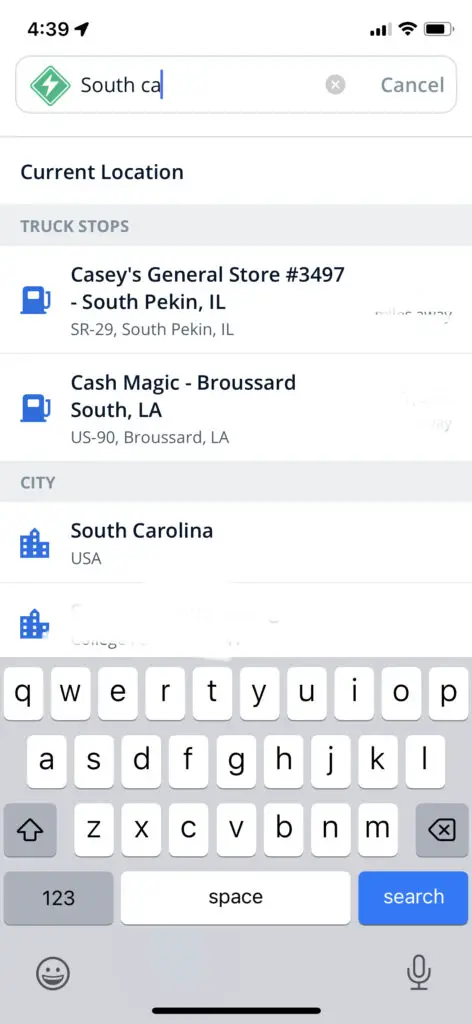
Personally, my experience is that when I type a state name such as “South Carolina” I did not get a list of stations in that state. Of course, the list will be huge so I tried the city name and type it into the app.
It showed me a list of fuel stops that had that name but not the actual list of fuel stops in that city.
How to Strategically Plan Your Mudflap Fuel Stops
Finding a location is one thing, but planning your route to maximize savings requires a bit more strategy:
- The “Filter by Price” Hack: Don’t just search for the closest stop. Use the app’s filter feature to sort by “Price per Gallon” rather than distance. Often, driving an extra 5–10 miles off a major highway saves significantly more than the cost of the extra fuel burned.
- Check for “In-App” Bonuses: Mudflap frequently partners with specific chains to offer extra cents off per gallon. Always check the “Featured Deals” tab in the app before you start your engine for the day.
- Combine with Fleet Cards: If you are a professional driver using a fleet card, Mudflap often allows you to stack your existing fleet card discounts with Mudflap’s negotiated rates. Always check the “Payment Methods” section in the app for your specific station to see if your card is supported.
Conclusion
Mudflap app is the only method you can search and find fuel locations near you. But it can do better. They can put a list of fuel locations on their website so it is easy to search.
Also, they could improve the search results in the app. Instead of showing all stations that match the name “South Carolina” they can actually show locations that for that state.
Frequently Asked Questions (FAQ)
- Q: Does Mudflap work at every gas station?
- A: No, it works specifically at the partner locations listed in the app. Always check your app map before you exit the highway.
- Q: Is the price in the app guaranteed?
- A: Yes, the price you see in the app is the price you pay at the pump. If you ever notice a discrepancy, use the app’s built-in customer support chat to resolve it.
- Q: Can I use Mudflap for personal vehicles?
- A: While originally designed for heavy-duty trucking, Mudflap is now widely available for personal vehicles as well. Check the app to see if your vehicle type is eligible at your local stations.