
Let’s be honest for a second. We’ve all been there—stuck at a checkout screen, staring at an empty promo code box, frantically googling for a discount. You find a site that promises a massive coupon, click it, and… absolutely nothing happens. Finding a working Vinted referral code shouldn’t be that frustrating.
Transparency Note: My Cash Back Reviews is an independent site. I personally use Vinted to declutter my own wardrobe and verify the referral process to ensure you get your full bonus. This post contains affiliate links; if you use them to sign up, I may earn a small commission at no additional cost to you, which helps support this site.
Well, if you’re signing up for Vinted, I have some good news and some bad news.
The bad news? Vinted doesn’t actually use traditional promo codes. If a coupon site tells you they have a secret text code to paste at checkout, they’re lying.
The good news? You can still easily grab a $15 sign-up bonus. You just have to use a direct member invite instead. If you want to skip the reading and jump right in, you can activate the official Vinted Invite Link to claim your bonus credits.
Here is exactly how the system works, how to claim your money, and why that promo code box keeps tripping people up.
The “No Code Box” Confusion (And How to Fix It)
When you first open a new account, you’ll probably look around for a place to type in a registration code. Actually, wait—let me rephrase that. You won’t find one because it doesn’t exist on the registration screen anymore.
Vinted handles everything through tracking links.
To get your welcome vouchers, you need to click a live referral link before you create your account. Once you click through, the platform automatically attaches the referral connection to your new profile in the background. It’s like a digital hand-shake between you, the person who invited you, and Vinted.
How to Use a Vinted Referral Code for Your $15 Bonus
Getting the bonus is simple, but you have to follow a few specific rules, or Vinted won’t trigger the payout. Think of it like a video game quest—you have to hit every checkpoint to get the loot.
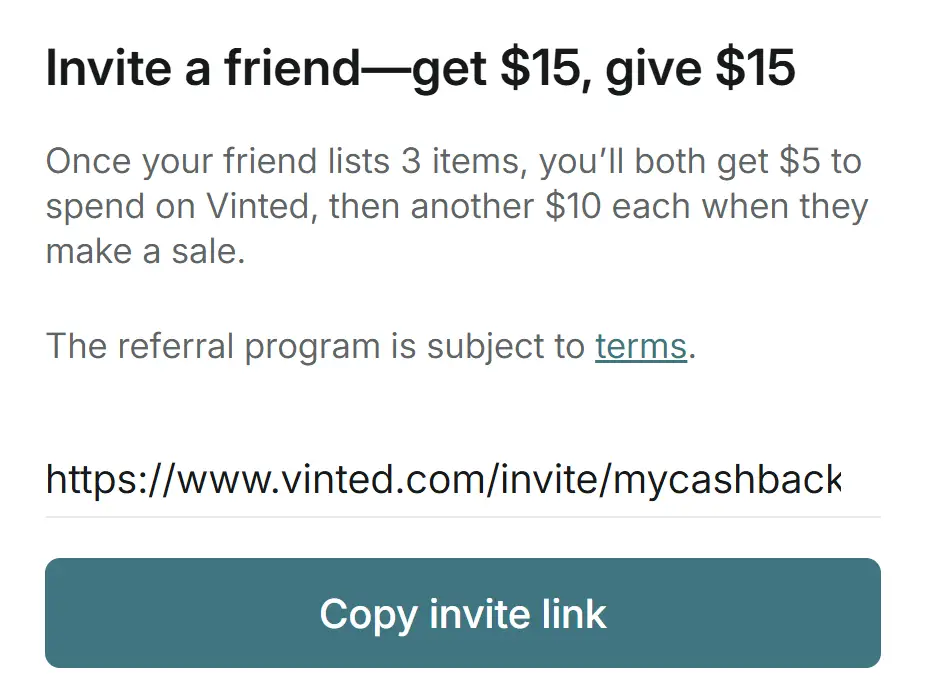
Here is the exact step-by-step breakdown:
- Click the Tracked Link: Use this verified Vinted Referral Link to open up the registration page.
- Create Your Account: Sign up using your email or social profiles.
- List 3 Items Fast: You need to list three items for sale within your first 7 days. This is the part most people forget! Dig through your closet, grab an old sweater or a pair of shoes, take a couple of clean photos, and post them.
- Claim Your First Vouchers: Once those three listings are live, you and your referrer both get two coupons worth $2.50 each ($5 total).
- Make a Sale: If you sell an item within your first 30 days, Vinted drops another five coupons worth $2.00 each ($10 total) right into your account.
Add that up, and it’s an easy $15 in total shopping credits.
How to Spend Your Vinted Vouchers
Once you earn your coupons, you don’t need to do anything special to use them. Vinted will automatically deduct the balance from your very next purchase, as long as your order total is $15.00 or more.
Just keep in mind that the $15 minimum applies to the item price alone. Shipping fees and the mandatory Buyer Protection fee don’t count toward that minimum total.
In my experience, the platform is easily one of the best places to clean out your wardrobe or find incredibly cheap vintage gear. It’s basically a massive, digital thrift store right on your phone. Just make sure you use a proper invite link when signing up, list your first few items quickly, and enjoy the free shopping credits!
The $15 Bonus Success Routine
Vinted’s referral system is stricter than most. If you want to ensure your $15 in vouchers actually lands in your account, follow my “success routine”:
- The “Clean Photo” Rule: When you list your 3 items to trigger the bonus, don’t use stock photos. Take clear, bright photos of the actual items. Vinted’s system sometimes flags and hides listings that look like “spam” or stock images, which means your listings won’t count toward the bonus requirements.
- Price Intelligently: When listing your 3 items, price them competitively so they actually sell within the 30-day window. If you want the full $15, you need that sale, so avoid pricing your items at $100 just to see if they sell.
- Sync Your Accounts: Make sure your email and phone number are fully verified in the app settings immediately after sign-up. Unverified accounts are often excluded from promotional payouts.
Common Questions About Vinted Bonuses
- Q: Why don’t I see a place to enter a promo code?
- A: You aren’t doing anything wrong! Vinted has moved away from manual “promo code boxes” and now uses tracked invite links. As long as you click an official referral link before you sign up, the system automatically tags your account for the bonus.
- Q: What if I didn’t get my vouchers?
- A: Check if you completed the “List 3 items” requirement within the first 7 days. If you did, contact Vinted support via the app; they can manually verify your referral link.
- Q: Do the vouchers expire?
- A: Yes, these bonuses typically expire after a few weeks. Don’t let them sit—use them on your next thrift find as soon as they hit your account.