
As a new user of Upside, you can get bonus on gas cashback when entering an Upside promo code. In this post, we will learn how to enter or change a promo code.
What is an Upside promo code?
The promo code for Upside is a combination of letters and numbers like this one CASHBACK25 for example. You can use it to get bonus cashback per gallon of gas. These promo codes usually don’t expire and can be used and shared with other users as well.
How to put a promo code in the Upside app?
To enter the promo code, open your Upside app and follow the steps below.
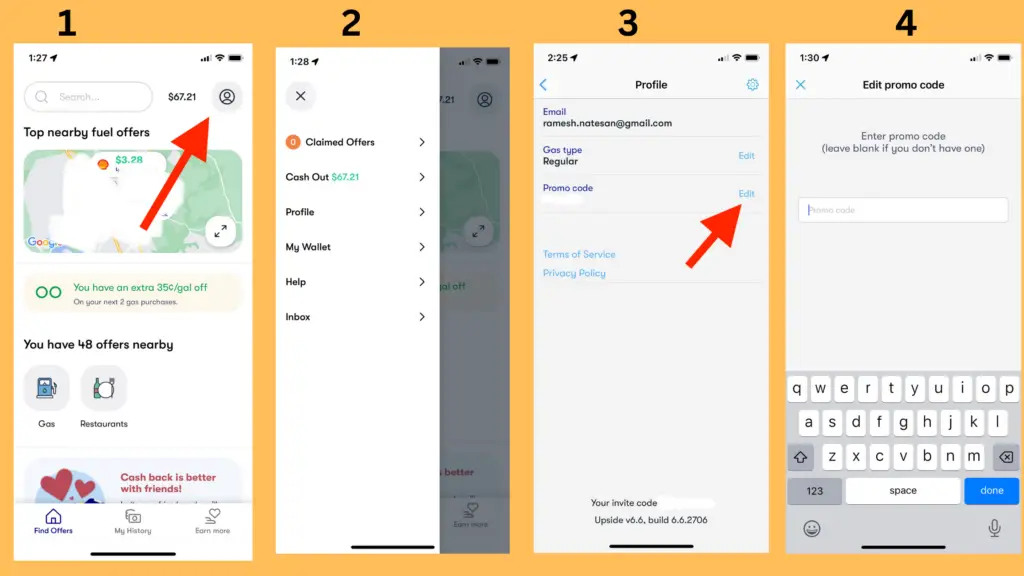
- Open Upside app
- Tap on your account icon
- Tap on Profile
- Tap the Edit link
- Now enter the promo code and hit the done key.
- Go back to the main screen.
- You will now see the promo discount on the main screen.
How do you change an old promo code?
If you have already used a code, you can change or update it. It can be done when you complete the following steps.
- Open Upside app
- Tap on the account icon
- Tap the Profile
- Tap on Edit next to the promo code
- You can now delete the old promo code and use a new one
How many codes can I enter at a time?
You can enter one promo code at a time in the app. The Upside app lets you redeem any number of promo codes when you enter them one by one. This is how you can get more bonus.
For example, you can use CASHBACK25 for a 25¢/gal bonus and then enter AMEX35 for another 35¢/gal bonus totaling a combined bonus of 60¢/gal.
Troubleshooting: When Your Promo Code Isn’t Working
If you’ve entered your code but don’t see the discount applied, don’t panic! Most issues are easy to resolve. Check these common culprits:
- Expired Offers: Many promo codes are time-sensitive or linked to specific promotional windows. If you’re trying to use a code from an old email or social media post, it may have reached its expiration date.
- New-User Requirements: Some of the best promo codes—especially those offering higher cents-per-gallon discounts—are exclusively for new accounts. If you have already completed a transaction or linked a card previously, the system may not allow you to apply a “new user” code to an existing account.
- Existing Transaction Conflicts: If you have already “claimed” an offer at a specific gas station before entering your promo code, the system might not apply the code retroactively. It is best to enter your code immediately after downloading the app and before you claim your first offer.
- Regional Restrictions: Some codes are geographically locked. If you found a code on a national forum, verify that it is valid in your specific state or area, as some deals are limited to certain regions or retail partners.
Conclusion
After you enter and redeem a promo code, it will stay on your profile until you change it with another valid code. This is ok and nothing to be concerned about.
Hope this post helped you in entering or changing a promo code in the Upside app. You should also check out some Upside promo codes.
If you have any other questions, you can always the Upside support site for frequently asked questions and answers to them.